
Menu maker
Make a restaurant menu you can change the same day
In ListoQ you build the menu itself — categories, items, prices, photos, size variants and allergens — and publish it to a page guests open from a QR code or a link.

Where this sits
This page is about building the menu content. The code and the link that carry it are covered on the QR menu generator page.
Two ways in
Start from the menu you have, or from an empty one
Most venues already have the menu written down somewhere. ListoQ imports that file, and it is usually the fastest way in.
Import what you already have
Upload a PDF, Excel or Word file, or a photo of the printed card. It arrives as a draft of up to 150 items per import, and you review every line before anything goes live.
Build it from scratch
Add categories, then items under them. This is the way in for a new venue, a seasonal card or a bar list that never existed as a file.

What you build
Everything a ListoQ menu item can carry
Categories and sections
Group items the way your kitchen thinks: starters, mains, wine by the glass, desserts. Reorder the whole section at any time.
Prices and size variants
One item can hold several sizes with their own prices, glass and bottle or small and large, instead of three near-identical entries.
Photos and descriptions
Give each item a photo, a description and its ingredients, so guests know what they are ordering before they ask.
Allergens and diet marks
Tag any of the 14 EU allergen categories on the item, plus vegetarian and vegan marks that guests can filter the menu by.
Hide without deleting
Take one item or a whole category off the live menu and keep it in the catalog for the week it comes back.
Order that makes sense
Drag categories and items into the order you want guests to read them in, not the order you happened to type them in.
Appearance
Make it read like your venue, not like a template
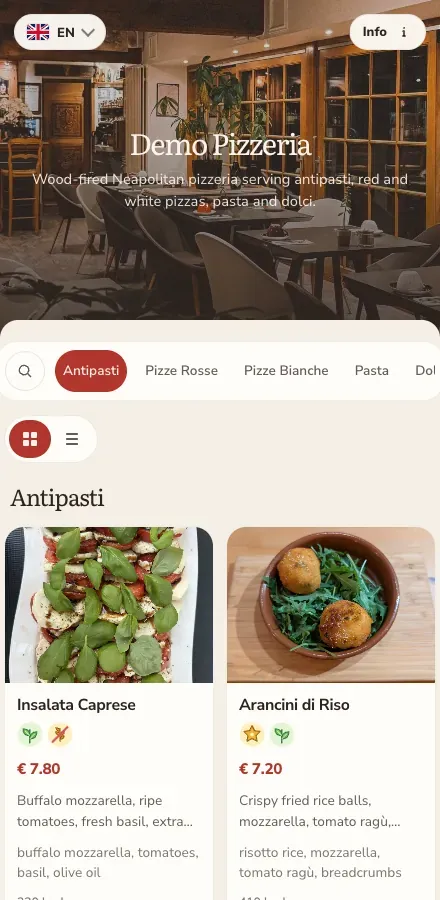
The same menu content can look like a neighbourhood bistro, a specialty coffee bar or a hotel restaurant.
- Color presets or your own colors, and a font that fits the room
- A hero image at the top of the menu page
- Prices your way: currency position, decimals, or no prices at all on a tasting card
- A plain list for a long drinks card, cards with photos for a food menu
Draft, publish, change
Nothing reaches the table before you say so
You edit a draft, and guests keep opening the last published version until you publish the new one. That makes a mid-service price change safe to start and finish whenever you get a minute.
- Up to 10 catalogs per venue, with one of them live at a time
- Up to 2,000 items in a menu, and up to 5 venues on one subscription
- The QR code and the link stay the same through every publish
Building a menu, answered
What people ask while they are setting one up
Yes. Upload a PDF, Excel or Word file, or a photo of the printed card, and it arrives as a draft of up to 150 items that you review before publishing.
Related pages
Next Step
Want to turn your food and drink menu into a clear customer page?
Start with your real content and keep one access point as your offer changes.