
Digital menu
Turn your paper menu into a beautiful digital menu
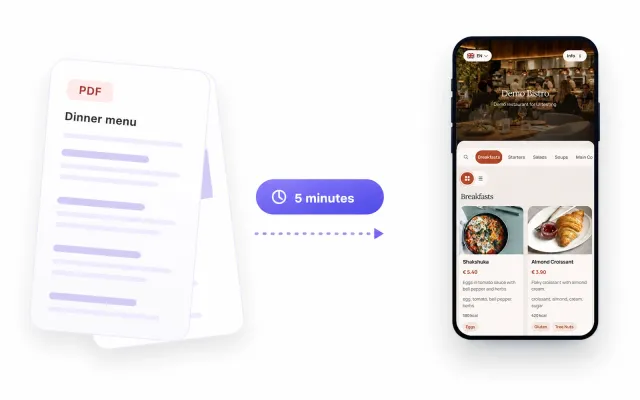
Upload a PDF, Excel or Word file, or a photo. ListoQ's AI builds the draft and translates it, and you publish the menu to one QR code you can update any time.
No designer needed
Pick colors, fonts and a hero image, and the menu looks like your venue.
30 days
Free trial
Every feature, no card required.
150
Items per AI import
Bring a whole menu in from one file or photo.
14
EU allergen categories
Marked on each dish, next to vegan and vegetarian marks.
1
QR code for good
It keeps working through every menu you publish.
Paper vs digital
Why venues move their menu from paper to ListoQ
The same everyday changes, handled two ways.
A price changes
Printed menu Reprint every copy
ListoQ digital menu Edit it and publish in minutes
A dish sells out
Printed menu Staff explain it at every table
ListoQ digital menu Hide it now, bring it back later
Guests from abroad
Printed menu A separate card for each language
ListoQ digital menu AI translates the whole menu in one run
Allergen questions
Printed menu A footnote, or ask the staff
ListoQ digital menu Marked on every dish
Dish photos
Printed menu Rare and costly to print
ListoQ digital menu A photo for every item
A brand-new menu
Printed menu New design, new print run
ListoQ digital menu Same QR code, new menu
How it works
From your current menu to a live ListoQ page in four steps
No typing every dish by hand and no designer. AI does the first draft, you check it and publish.

- 1
Upload your menu
A PDF, Excel or Word file, or a photo of the printed menu. Up to 150 items per import.
- 2
Review the AI draft
Categories, dishes, descriptions and prices arrive as a draft you check and edit.
- 3
Translate and style
Fill every menu language in one run, then pick colors, fonts and a hero image.
- 4
Publish and print the QR
Guests scan and open your latest menu. The code stays the same after every update.
On the guest's phone
What a digital menu looks like to the people at the table
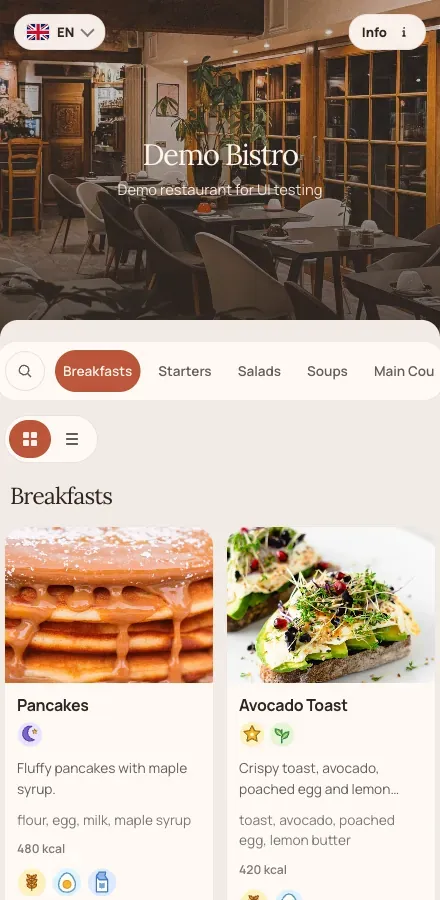
The page opens in the phone browser, styled like your venue, showing the version your team published last.

Categories they can move between
Starters, mains, wine, desserts. Guests jump to the section they want instead of scrolling one flat list of everything you serve.
Photos, descriptions and the price
Every item carries its own photo, description, ingredients and price, so staff answer fewer questions about what a dish actually is.
Allergens on the dish, not in a footnote
The 14 EU allergen categories sit on the item itself, next to vegetarian and vegan marks, where the guest is already looking.
The language the guest reads in
Publish the same menu in several languages and let guests switch on the page. It matters anywhere visitors outnumber regulars in season.
Your side of the menu
An admin built for everyday menu changes
Everything your team changes during the week happens in one ListoQ workspace.

Draft, then publish
Work on changes all afternoon and publish once. Guests never see a half-finished menu.
Hide what ran out
Hide a dish or a whole category and bring it back later without retyping.
Bulk price changes
Raise or lower prices for selected items or a whole category by a percentage in one step.
AI translation
Fill dish and category names and descriptions in every menu language in one run.
Drag-and-drop order
Reorder categories and dishes so the ones you want to sell come first.
Your venue's look
Color presets or custom colors, fonts, a hero image, and a list or card view.
Made for food service
A digital menu for every kind of venue
Start from a ListoQ menu template made for your type of venue.
Digital menus, answered
What venues ask before they move off print
From a QR code on the table, or from a link you send in a message or put in a social profile. The menu is a web page that opens in the phone browser.
Related pages
Next Step
Want to turn your food and drink menu into a clear customer page?
Start with your real content and keep one access point as your offer changes.