
01Build
Structure the menu the way guests read it
Group dishes and drinks into categories, then add descriptions, prices, photos, allergens, and dietary marks. Reorder categories whenever the menu changes.
Solutions
Add dishes, drinks, prices, photos, and allergens, publish to a QR code or link, and adjust how the guest page looks, all from the admin workspace.


Core idea
Clear for customers. Under your control.
Platform
From the first category to the version your guests are reading right now.
Group dishes and drinks into categories, then add descriptions, prices, photos, allergens, and dietary marks. Reorder categories whenever the menu changes.
Upload a PDF, an Excel or Word file, or a photo of the printed menu. ListoQ reads it, builds the categories and items, and hands them back for your review before anything is saved.
AI translation fills dish and category names and descriptions in every menu language in one run. You review the text, adjust local terms, and publish when it reads right.
Every edit stays in the draft until you publish. Publishing swaps the guest page immediately, so the menu changes exactly when you decide it should.
Guests open the menu from a QR code or a link. The code is tied to the venue, so it keeps working after renames and republishes.
Select a few dishes or a whole category, then raise or lower prices by a percentage, set one price, or show, hide and move them to another category. A preview shows the new prices before you apply them.
Two sides of the product
The guest page stays simple on purpose. Everything that keeps it simple lives in the ListoQ admin workspace.
Guest page
Readable on any phone
Categories, prices, and item details laid out for a small screen — no pinching, no zooming, no PDF viewer.
Language switch built in
Guests pick the language they read and the whole menu follows, category and dish names included.
The details that matter
Photos, ingredients, allergens, and vegetarian or vegan marks on the items that carry them.
Your venue on the same page
Address, contacts and social profiles sit next to the menu, so guests find you without leaving the page.
Admin workspace
Edit without a designer
Change a price, swap a photo, add a seasonal dish in ListoQ — all from one screen, without a request to anyone.
Your brand, not a template
Pick a color preset or enter the colors from your brand book, choose a display and a body font, upload a cover image, and link your social profiles. Settings, not a redesign project.
Publish on your schedule
Work in the draft as long as you need and publish when the change is ready — the live menu waits for you.
Many items, one action
Raise prices across a category by a percentage, hide a sold-out section, or move dishes to another category without opening each one.
Already have a menu?
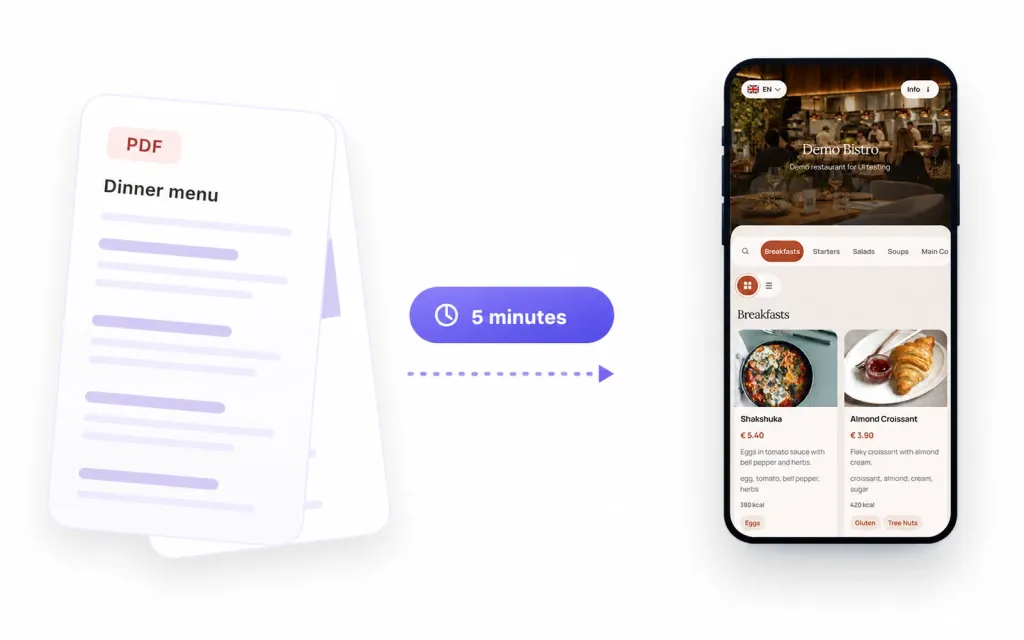
Upload your existing menu as a PDF, photo, scanned image, or document. ListoQ recognizes categories, dishes, descriptions, and prices, and returns a ready-to-share QR menu you can fine-tune in the admin workspace.
Benefits by venue type
The same ListoQ QR menu foundation can support a dining room, a busy counter, a changing drinks list, or a compact event menu.
Present courses, pairings, desserts, allergens, and seasonal dishes while keeping the dining-room menu current.
See the use case 02Make breakfast, lunch, cakes, and daily specials easy to browse during changing dayparts.
See the use case 03Show sizes, milk options, syrups, pastries, and seasonal drinks without crowding a counter board.
See the use case 04Organize cocktails, wines, beers, tasting notes, and changing availability in a readable drinks menu.
See the use case 05Update fresh batches, flavors, sizes, preorder details, and allergen information as the selection changes.
See the use case 06Share a focused menu at windows and events, then update prices or sold-out items without replacing the sign.
See the use caseNext Step
Start with your real content and keep one access point as your offer changes.