
MustHaveMenus alternative
A MustHaveMenus alternative for the menu guests open by QR code
MustHaveMenus is built around menu design for print. ListoQ is built for the digital menu: AI import, AI translation, allergens and one plan for up to 5 venues.

Side by side
ListoQ leads in 15 of 19 rows
Choose ListoQ when the menu guests open on their phone matters more than printed menus, and when you run more than one venue.
- 15rows where ListoQ leads
- 3rows where both are level
- 1row where MustHaveMenus leads
Side by side
ListoQ and MustHaveMenus, row by row
Grouped by what you decide on first: price and plans, building the menu, design, and the guest menu with its QR code.
Price and plans
Price
ListoQ One plan with every feature: €14.99 a month, or €10.83 a month on the 12-month plan.
MustHaveMenus Design $24 a month and Pro $50 per location a month, both billed yearly. Enterprise is priced on request.
ListoQ
Free trial
ListoQ 30 days with every feature, no card needed.
MustHaveMenus A free trial is offered; its length is not listed.
ListoQ
Venues on one subscription
ListoQ Up to 5 venues on one subscription, no extra charge per venue.
MustHaveMenus Pro is priced per location; extra locations are $49 a month each.
ListoQ
Dishes per menu
ListoQ Up to 2,000 items per menu on the one plan.
MustHaveMenus Not listed on MustHaveMenus's public pricing or feature pages.
ListoQ
Feature tiers
ListoQ None. Every customer gets the full product, trial included.
MustHaveMenus Design, Pro and Enterprise, plus paid add-ons for signage and listings.
ListoQ
Building the menu
Import an existing menu
ListoQ AI import reads a PDF, Excel or Word file or a photo into a draft you review, in minutes.
MustHaveMenus Not listed on MustHaveMenus's public pricing or feature pages.
ListoQ
Menu translation
ListoQ AI translation fills dish and category names and descriptions in every menu language in one run.
MustHaveMenus Not listed. Pro includes an AI spell check for menu text.
ListoQ
Workspace languages
ListoQ The admin workspace is available in 10 languages, and the list is growing.
MustHaveMenus Not listed on MustHaveMenus's public pricing or feature pages.
ListoQ
Draft, then publish
ListoQ Edit in a draft, preview it, publish when ready. Guests never see half-done changes.
MustHaveMenus Edit, then publish to print, signage and web. A staging area for designers is on Enterprise.
ListoQ
Sizes and variants
ListoQ Size variants with their own prices: glass or bottle, S, M or L.
MustHaveMenus Extra prices and modifiers.
Level
Hide sold-out dishes
ListoQ Hide a dish or a whole category without deleting it, on every plan.
MustHaveMenus Toggling an item off when it runs out is listed on Enterprise.
ListoQ
Bulk edits
ListoQ Select many items to raise prices by a percentage, set one price, hide them or move them in one step.
MustHaveMenus Not listed on MustHaveMenus's public pricing or feature pages.
ListoQ
Allergens and diets
ListoQ The 14 EU allergen categories plus vegetarian and vegan marks on every dish.
MustHaveMenus Not listed on MustHaveMenus's public pricing or feature pages.
ListoQ
Design
Colors, fonts and images
ListoQ Color presets or your own colors, fonts and hero image.
MustHaveMenus A brand kit with your fonts, colors and logos.
Level
Price display
ListoQ Choose the currency position and decimals, or hide prices altogether.
MustHaveMenus Not listed on MustHaveMenus's public pricing or feature pages.
ListoQ
Printed menu design
ListoQ Built for the guest menu on a phone. Printable QR codes, but no print menu templates.
MustHaveMenus Thousands of print templates, print-ready PDFs, table tents and posters, and professional printing.
MustHaveMenus
Guest menu and QR code
Languages on the guest menu
ListoQ Publish the menu in several languages; guests switch language on the page.
MustHaveMenus Not listed on MustHaveMenus's public pricing or feature pages.
ListoQ
QR code that never changes
ListoQ One QR code per venue that keeps working when the menu, the prices or the menu address change.
MustHaveMenus Unlimited QR codes whose links can be changed without reprinting.
Level
QR code design
ListoQ QR studio with your colors, a caption in your font, and PNG or SVG export for print.
MustHaveMenus Not listed on MustHaveMenus's public pricing or feature pages.
ListoQ
Checked on November 18, 2026 against MustHaveMenus's public pages:
MustHaveMenus may have changed its plans since this date — check its site before deciding. MustHaveMenus is a trademark of its owner; ListoQ is not affiliated with it.
Why venues switch
What ListoQ does best
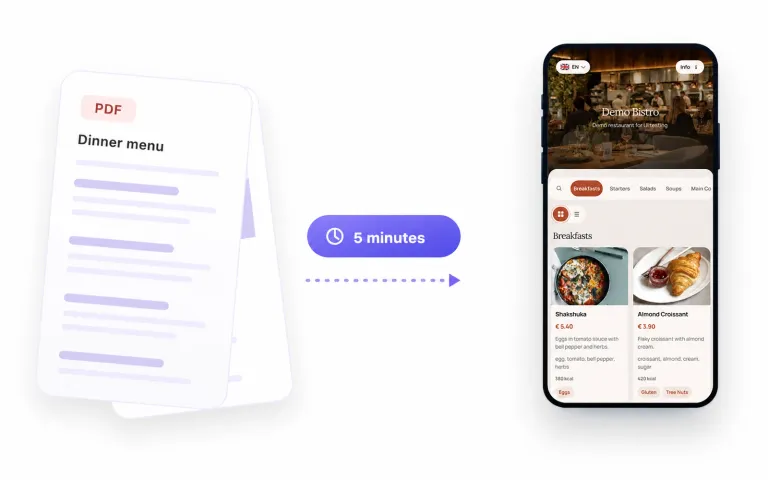
AI import from the menu you already have
Upload a PDF, Excel or Word file or a photo. ListoQ turns it into categories, dishes and prices in a draft you check.

Every language in one run
AI translation fills names and descriptions in every menu language. You review the result before guests see it.
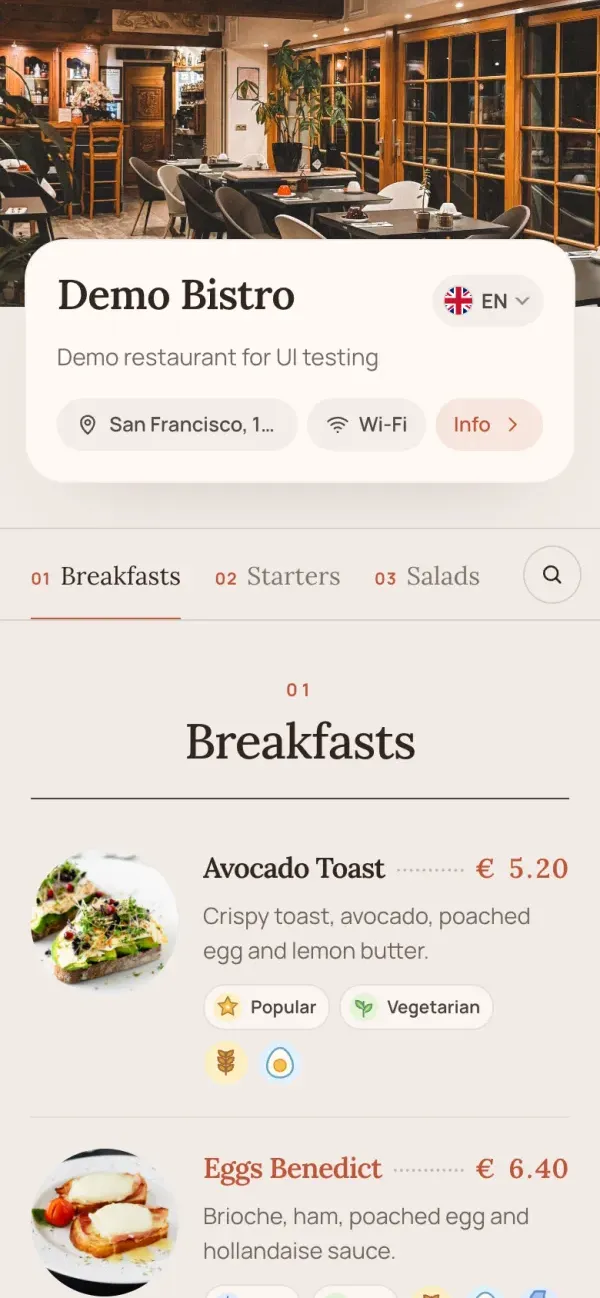
A menu that looks like your venue
Combine cover styles and layouts, pick colors and fonts, and add your own hero image.

Price changes across the menu in one step
Raise prices by a percentage, hide or move many dishes at once, then publish the draft when it is ready.
Fair to say
When MustHaveMenus may suit you better
MustHaveMenus is the better fit if you design printed menus, table tents and posters, want professional printing or digital signage, or need Toast and Square POS sync.
Moving is quick
Move your menu from MustHaveMenus to ListoQ
- 01
Export or photograph your menu
A PDF, a spreadsheet or a clear photo of your current menu is enough.
- 02
Import it with AI
ListoQ reads dishes, categories and prices into a draft. Fix anything, add photos and allergens.
- 03
Publish and print the QR code
Publish the draft and print the venue's QR code. It keeps working for every later change.
Questions about switching
For several locations, yes. MustHaveMenus Pro is $50 per location a month billed yearly, while one ListoQ plan covers up to 5 venues.
Next Step
Want to turn your food and drink menu into a clear customer page?
Start with your real content and keep one access point as your offer changes.